How to Pack a TV for Moving Without Damaging It
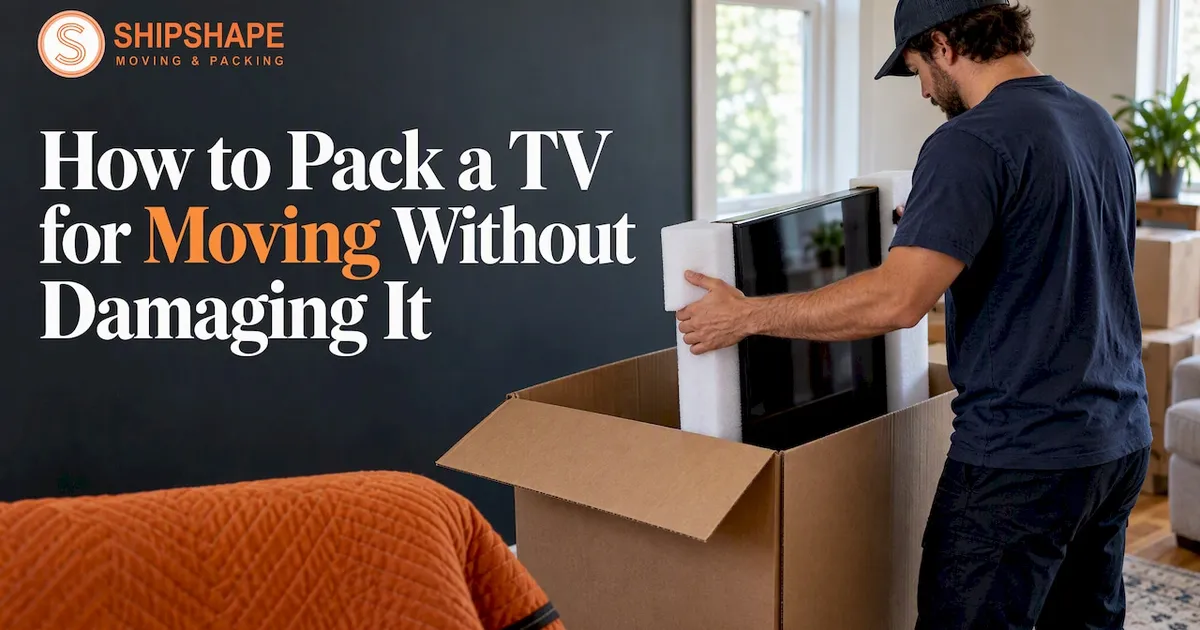
To pack a TV for moving, unplug it and photograph the cables, remove the stand, cover the screen without taping it, pad all four corners, and put the TV in a box that fits it. Then keep it upright every time it is lifted, loaded, driven and unloaded. The rest of this guide covers each step, what to do without the original box, how a 65-inch set differs, and when it is smarter to let a crew handle it.
TL;DR
- Photograph the cable connections, bag and label the hardware, and take off the stand or wall mount before you wrap anything.
- Protect the screen with a soft layer or bubble wrap, and tape only to the TV's case, never to the glass.
- The original box with its inserts is the best container. Without it, use a purpose-made TV box with foam corners, or a blanket-and-stretch-wrap bundle as a fallback.
- Keep the TV upright from the living room to the truck to the new wall. Never lay it flat or stack things on it.
- A large or high-value TV is a good candidate for professional packing and handling, which we offer in the Bay Area.
Table of Contents
- Why TVs break in moves
- What you need before you start
- Step 1: Disconnect and document
- Step 2: Protect the screen
- Step 3: Pad the corners
- Step 4: Choose the right box
- Step 5: Place the TV in the box and fill the gaps
- How to pack a TV without the original box
- How to pack a 65-inch TV for moving
- Loading and transporting the TV
- Our perspective: where DIY works and where it does not
- When to hand the job to professionals
- Common mistakes to avoid
- FAQ
- Sources
Why TVs break in moves
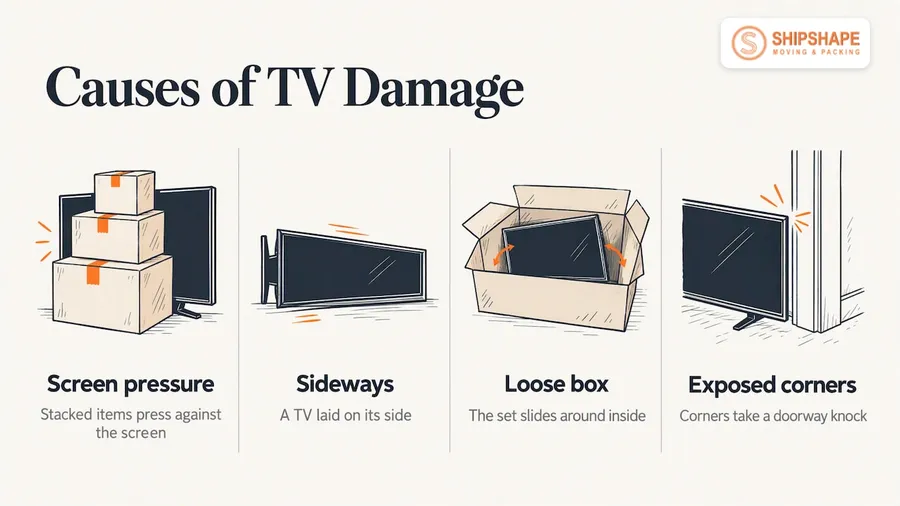
A flat-screen is thin, wide and heavy for its depth. Its weight rests on a panel that cannot flex. Most moving damage comes from the same few causes: pressure on the screen from items stacked against it, a TV laid on its side, a box that is too loose so the set slides around, and exposed corners that take a knock in a doorway.
The shipping guidance from UPS is blunt on the orientation point: LCD and LED displays are not built to withstand the extra pressure of being laid on their sides, so a TV should stay upright through handling. That one rule prevents more cracked screens than any gadget you can buy.
Everything below follows from it: protect the screen, protect the corners, stop movement, stay vertical.
What you need before you start
Gather materials first so you are not improvising halfway through. Here is a practical kit:
- The original TV box and foam inserts, if you still have them, or a flat-screen TV box sized for your set
- Bubble wrap, or a soft foam sheet or screen cover
- Foam corner protectors
- Moving blankets or furniture pads
- Stretch wrap (for the no-box method)
- Packing tape
- Zip-style plastic bags and a marker
- A phone to photograph the back panel
- A second person. Most sets over 40 inches are a two-person lift.
If you also have a soundbar, a game console and a cable box, give each device its own labeled bag of cables. You will thank yourself on the first evening in the new place.
Step 1: Disconnect and document
Unplug the TV and every cable. Before you pull them, take a clear photo of the back panel so you can reconnect everything without guessing.
The Home Depot's TV packing guide suggests photographing the connections, removing the stand or wall mount, cleaning the TV, taking the batteries out of the remote, and grouping accessories in labeled plastic bags. UPS gives similar advice: clean the set before taking off the stand or mount, bag and identify the nuts and bolts, and keep the manuals and installation instructions with the TV.
A few habits make this step pay off:
- Write on each bag what it holds, for example "TV stand screws" or "wall mount bolts."
- Tape the stand's bag to the stand, not to the screen.
- Put the remote, batteries (removed) and manual in one bag and keep it with you rather than on the truck.
- If the TV is wall-mounted, keep the mounting plate screws together with the bracket.
Step 2: Protect the screen
The screen is the expensive part and the easiest to scratch or crush. Cover it with the TV's original sleeve if you kept it. Otherwise use two layers of bubble wrap, which is the Home Depot guide's recommendation.
The key rule: secure the covering to the TV's frame or case, never to the screen. Tape residue on a panel is a nuisance at best. UPS suggests a thin foam sheet over the screen, held at the edges with removable adhesive, and it advises against putting accessories on the screen side.
If you are using bubble wrap, wrap from the top of the set so the layers overlap and hold themselves in place, then fasten the ends to the back or the bezel.
Step 3: Pad the corners
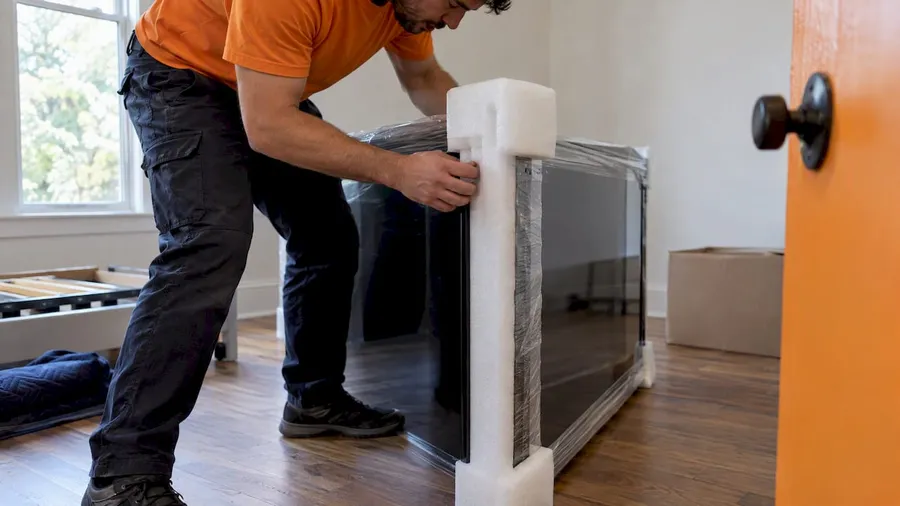
Corners and edges take most of the impact when a TV is bumped. Fit foam corner protectors on all four corners before the TV goes in a box. The Home Depot guide says to pad every corner with foam or extra bubble wrap before placing the wrapped set in its box.
Put the corners on while the TV is standing upright, with a helper steadying it. Do not lay the set flat on a bed or floor to do it. Secure the foam with stretch wrap or mover's wrap so it cannot slide off while you lift.
Step 4: Choose the right box
The original box
The best container is the one the TV came in, with its molded inserts. It was designed around that exact set. If the box is in the garage or a storage unit, retrieve it before moving week, and check that the inserts are intact.
A replacement TV box
Without the original, buy a box made for flat-screens. A few things to know:
- Sizes are given by screen diagonal, but the carton must fit the physical width, height and depth of the set. According to iBox Factory, screen-size classes do not reflect the width or height of the carton needed for transport. Measure the TV itself, including the bezel.
- Adjustable two-piece boxes are common. Lowe's lists a large adjustable two-piece box that fits flat-screen TVs up to 70 inches.
- ULINE offers flat-panel TV boxes in classes from 19 to 22 inches up to 75 to 86 inches, and its listed 32 to 55 inch models are double-wall corrugated.
- Construction matters. iBox Factory notes that large, flat and heavy items are hard on corrugated cardboard, which is why double-wall construction is important for structural strength.
Avoid a general-purpose box that happens to be big enough. The Home Depot guide recommends one box per TV, with foam corner cushions and a screen protector when you are not using the original.
Quick comparison
| Option | Protection | Best for | Watch out for |
|---|---|---|---|
| Original box and inserts | Highest, made for the exact set | Any TV you still have the box for | Worn or crushed inserts |
| Purpose-made TV box with foam corners | High | Sets without a box, local or long-distance moves | Sizing by diagonal rather than real dimensions |
| Blanket and stretch-wrap bundle | Moderate | Short local moves with an experienced crew | No rigid shell, so it needs careful loading |
| Loose in the truck, unwrapped | Poor | Nothing | Scratches, cracked panels |
Step 5: Place the TV in the box and fill the gaps
With the screen covered and corners padded, slide the TV into the box vertically. Two people make this easy: one holds, one guides.
UPS says to line the bottom of the box with cushioning and add foam edge protection, then pack material around the set until it cannot shift from side to side. Fill any gap above the TV as well. Furniture pads or towels do the job if you have nothing else.
Place the stand, remote and any hardware in their bag against the back of the set, not against the screen. Then seal the box with packing tape along every seam, and label it clearly: TV, fragile, this side up, and the room it goes to.
Give the box a gentle shake test before you move on. If you hear or feel the TV slide, add more filler.
How to pack a TV without the original box
This is the most common situation, and there are two reasonable routes.
Route one: buy a TV box. This is the safest answer. See the box section above, measure the set, and pick a carton with foam corners.
Route two: wrap it like a mover. If you cannot get a box, the Home Depot guide describes this method:
- Cover the screen with two or three layers of bubble wrap.
- Pad every corner with foam.
- Lay a moving blanket on a clean surface and place the TV on it, screen up.
- Fold the blanket over the set and tape the edges.
- Wrap the whole bundle with stretch wrap, top to bottom and side to side.
Once wrapped, the TV still travels upright. The bundle has no stiff shell, so it should never have anything leaned on it and should be loaded last or in a protected spot. It suits a short local move far better than a cross-country trip.
How to pack a 65-inch TV for moving
A 65-inch set follows the same method, but the margin for error is smaller. Larger panels flex more, the box is awkward to carry, and a single dropped corner does more damage.
- Check the carton size against the TV's actual measurements, not just its 65-inch class. The Lowe's box mentioned above covers sets up to 70 inches, and ULINE lists larger classes if you need them.
- Fit four foam corners with the TV standing upright and a second person steadying it, then secure them with wrap.
- Slide the set into the box, fill the space at the top, and seal every seam.
- Use two people for every carry, one at each end, and walk the path first so doorways and stairs are clear.
- Keep the carton vertical, and carry it by its sides, not by gripping the screen area.
If you are unsure about a large set, a wall-mounted OLED, or a TV you cannot easily replace, hand that one item to professionals.
Loading and transporting the TV
The box protects the TV only if the truck does not undo the work. A few rules:
- Keep it upright. This applies to the trip down the stairs, onto the truck, and out again.
- Do not stack heavy boxes, or anything, on or against it.
- Place it between two flat, firm items, such as a mattress against a wall and a sturdy dresser, so it cannot tip or slide. Securing it to the truck wall's rub rails with a tie-down strap is another option.
- Put it in a stable spot away from the door, where items are less likely to be tossed in at the last minute.
- In a car, stand it upright on the back seat or in an SUV cargo area, wedged with blankets, not flat in a trunk.
On arrival, keep the box upright, lean it against a wall if you need to, remove the tape carefully so the knife does not reach the screen, and get help to lift a big TV out.
Our perspective: where DIY works and where it does not
We pack and move homes, apartments and offices across Berkeley, San Francisco and the wider Bay Area, including local moves around Oakland, and a TV is one of those items where the plan matters more than the materials. TV damage usually comes down to three decisions: the set was not upright, it was not secured against movement, or it was handled by one person.
If you have the original box, a helper and a short drive, packing a TV yourself is perfectly reasonable. If you are moving up several flights of narrow Bay Area stairs, working with a large set, or the TV sits among a lot of other fragile items, the cost of a mishap goes up quickly. That is where careful packing and labeling by a crew earns its keep.
We also push clear communication: tell us the size of the TV, whether it is wall-mounted, and whether you still have the box, and we will plan the crew and materials for it. Surprises on moving day are what we try to prevent, and a written quote with no surprises is part of that.
When to hand the job to professionals
Packing a TV yourself makes sense when the set is modest, the box exists and the route is simple. Consider a crew when:
- The TV is large, wall-mounted, or has no box.
- You are moving several TVs along with art, glass, instruments or collectibles.
- The move involves stairs, elevators or tight Bay Area streets.
- You are moving long-distance and the set will spend days in a truck.
- You simply do not have a second pair of hands.
Our professional packing service handles careful packing and labeling, and for items that need extra care, our white glove handling covers valuables. If you are moving within the Bay Area, local moves are billed by the hour, as published on our pricing page: 2 movers $190/hr, 3 movers $260/hr or 4 movers $330/hr, plus an $80 truck fee, with a $620 minimum. Other services, including long-distance moves and large home moves, are quoted individually. We provide written, not-to-exceed quotes.
For wider planning, our moving tips and tricks cover the rest of the house, and our apartment moving page explains how we handle buildings with elevators and tight stairwells.
Common mistakes to avoid
- Taping the screen. Tape belongs on the frame, the wrap or the box, never on the glass.
- Laying the TV flat. Even in a car, it should stand.
- Using a box that is too big. A loose TV slides. Fill the gaps or pick a smaller carton.
- Packing the remote or stand against the screen. Keep accessories at the back of the set.
- Skipping the photo. Five seconds with your phone saves an hour of cable hunting.
- Doing a big-screen lift alone. Strained backs and dropped TVs are the usual result.
- Not labeling the box. Mark it fragile and this side up, so everyone loading it treats it right.
FAQ
What is the best way to pack a TV for moving?
Use the original box and inserts if you still have them. Photograph the cables, remove the stand, cover the screen without taping it, pad the corners, fill any gaps, seal and label the box, and move it upright. If you have no original box, buy a TV box sized to the set's real dimensions.
Can I move a TV without a box?
Yes, for short local moves. Wrap the screen in two or three layers of bubble wrap, pad the corners with foam, fold a moving blanket around the set, tape the edges and cover the bundle with stretch wrap. Keep it upright and load it where nothing can lean on it.
Can a TV lie flat during a move?
It should not. UPS advises keeping a television upright throughout handling, because LCD and LED displays are not designed for the pressure of lying on their sides. Stand it in the truck between flat, sturdy items, or strap it to the wall rails.
What size box does a 65-inch TV need?
A box rated for your set's actual measurements, not just the diagonal. Some adjustable two-piece boxes cover sets up to 70 inches, and larger classes are sold separately. Measure the TV's width, height and depth before you buy.
Should I hire movers to pack my TV?
It is worth considering for large, wall-mounted or valuable sets, for moves with lots of stairs, and for long-distance relocations. A crew brings the materials and the extra hands. We can include TV packing in a local, long-distance or apartment move.
Sources
- How to Pack a TV for Moving, The Home Depot
- How To Ship a TV, UPS
- Large TV Moving Box, Lowe's
- Flat-Panel TV Moving Boxes, ULINE
- TV Box Dimensions: Sizing a Carton to a Screen, iBox Factory