IT Equipment Moving: A Checklist for Bay Area Offices

Moving IT equipment safely comes down to four things: a complete inventory, labels on every device and cable, careful transport, and a tested restart in the new space. Your IT lead owns the data and network side. A licensed moving crew handles the packing, lifting and truck. ShipShape Moving provides full-time, background-checked crews for Bay Area office moves.
Key Takeaways
- Inventory every device, circuit and license before you touch a cable, and mark each item as move, replace, retire or leave behind.
- Verify backups, photograph the rack and label both ends of every cable before anything is powered down.
- Server hardware has environmental limits. IBM’s site-planning guidance lists a 18-27°C operating range and a 60% relative humidity ceiling for the systems it covers (2021 edition).
- Heavy racks and sensitive gear belong with professional movers, not volunteers with a borrowed hand truck.
- Plan the restart in order: circuit, firewall, core switch, then Wi-Fi, desks and conference rooms. Test before staff arrive.
Table of Contents
- Start with an inventory, not boxes
- Before you disconnect anything
- Packing and protecting IT equipment
- A server room move checklist
- Transport day
- After the move: reconnect and test
- What an IT-aware move costs with ShipShape
- Get your office technology moved with a crew you can name
- Our perspective
- FAQ
- Sources
Start with an inventory, not boxes
Most failed IT moves fail at the planning stage. A cable nobody labeled or a software license tied to an old address will cost more time than the truck ride.
A practical plan, as laid out in TechMate’s 2024 relocation guide, documents current devices, circuits, cloud services, phone numbers, licenses and the person responsible for each one. Every item then gets a status: move, replace, retire or leave behind. Retired devices need their data securely wiped and their disposal documented.
A spreadsheet is enough. For each device record:
- A label ID that matches a physical sticker
- The old location and the new location (floor, room, desk or rack unit)
- Its status: move, replace, retire or leave behind
- The person who will confirm it works after the move
NetSys’s 2026 move-planning page describes the same workbook approach and adds a useful habit: begin planning while you are still choosing the space. Share the address, floor plan, target date, headcount and the systems that cannot go down, then agree on who can approve a delay.
What belongs on the inventory
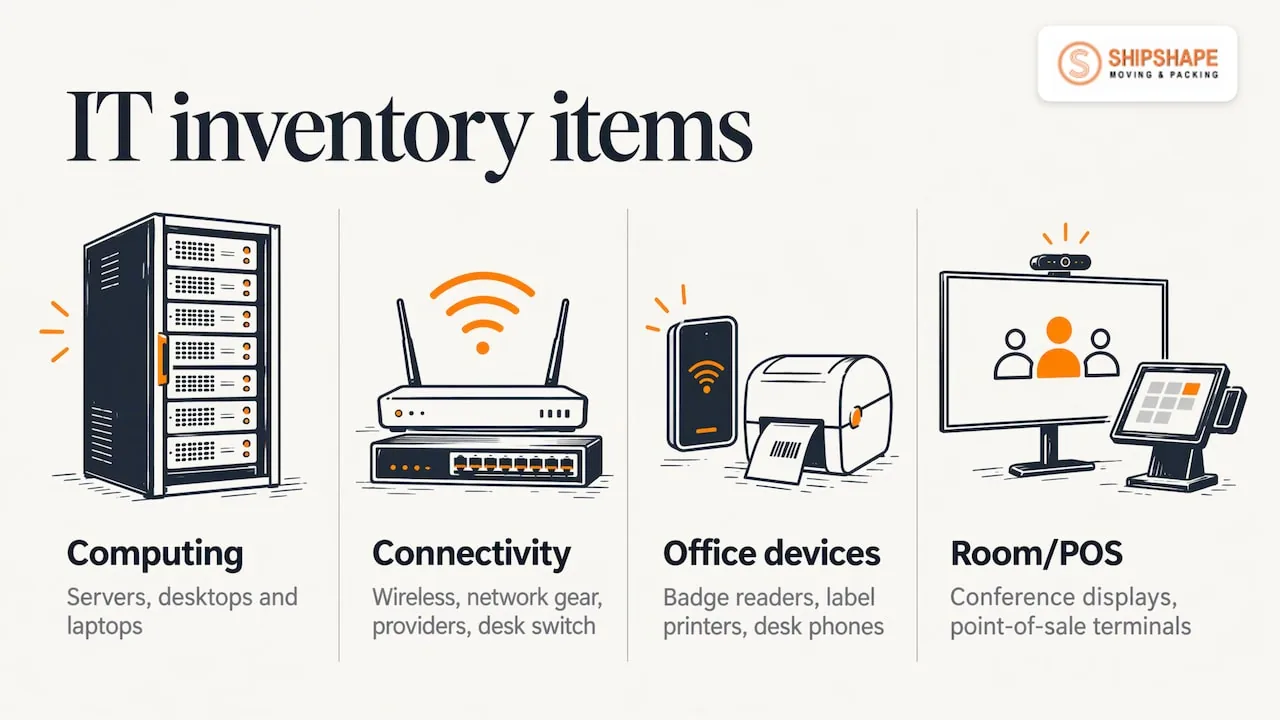
The scope that Ready.gov uses for business technology planning is a good reminder of how wide the list should run: servers, desktops, laptops, wireless devices, network equipment and the providers that supply your connectivity. Add the items people forget: label printers, badge readers, desk phones, conference room displays, point-of-sale terminals and the small switch under someone’s desk.
Check the destination early
Walk the new space before the date is fixed. Look for the location of the network closet, power outlets near the rack, and whether the circuit installation is scheduled. In Oakland, a Jack London Square loft, an Uptown office above a ground-floor shop and a converted warehouse near West Oakland all behave differently. Ask building management about freight elevator access, loading zone rules and any required reservation. The same questions apply to a downtown Berkeley office near the Shattuck corridor or a SoMa suite in San Francisco, where curb space is limited.
If you are coordinating deliveries of new equipment alongside the move, resources on coordinating deliveries and move-in schedules cover the building access, power and cabling questions that tend to collide on move-in day.
For the broader office side of the plan, our guides on small office move planning in Oakland and an office move checklist for Bay Area businesses fit around the IT plan.
Before you disconnect anything
The order matters. Do these steps in sequence, and do not let anyone unplug a device until the previous step is finished.
- Back up and verify. A backup that has never been restored is a hope, not a backup. Confirm that a recent copy opens and that the people who rely on it know where it is. This is your IT lead’s job.
- Export configurations. Save switch and firewall configurations so the network can be rebuilt quickly.
- Photograph the rack and the closet. Take photos from the front and back, close enough to read port numbers.
- Label both ends of every patch cable. One end matches the device, the other matches the port. TechMate’s guide also recommends labeling each workstation, monitor, dock, phone and peripheral to its destination desk, and keeping cables in labeled bags with their devices.
- Shut down properly, then disconnect. Power equipment off before it is unplugged and moved.
A useful rule: if a person on the move crew could not tell where an item goes in the new office just by reading its label, the label is not finished.
Where a crew helps at this stage
Once your devices are labeled to destination desks, a moving crew can deliver each one to the right place without a floor-plan briefing for every box. ShipShape crews are full-time ShipShape employees, never subcontractors, and every mover is background checked before their first job. That matters when your crew is carrying hard drives, laptops and a server rack through an occupied building.
Packing and protecting IT equipment
Packing technology is different from packing books. Screens scratch, drives dislike impact and tangled cables take hours to sort out.
- Keep original boxes when you have them. Foam inserts fit the device they came with.
- Wrap monitors and displays individually, screen facing inward toward padding, and keep them upright. Our guide to packing a TV for a move walks through the same method for flat panels.
- Group each workstation. Tower, monitor, dock, keyboard and cables go together, with the desk label on every piece.
- Pack laptops and portable drives yourself. Staff can carry them personally, or you can pack them in labeled, padded containers for the crew.
- Use wardrobe or medium boxes for cable bundles and keep the bag taped to its device.
- Never ship loose hard drives in a box of mixed items. Pad them and mark them clearly.
ShipShape trucks are stocked with moving blankets, stretch wrap, dollies, straps, and floor and door-frame protection. Those supplies matter in office buildings with narrow corridors and finished floors. If you would rather hand packing off, our packing service covers packing and labeling, and our packing supplies checklist lists what to gather if your team packs its own desks.
A server room move checklist
A server room or network closet needs a stricter checklist than the rest of the office. Even a small closet with one rack, a firewall and a switch deserves this.
Before the move
- Confirm which systems can be offline and for how long, and tell the people who depend on them.
- Record rack positions so equipment can be reinstalled in the same order.
- Check the manufacturer’s documentation for each system’s transport requirements.
- Verify that the new room has power, cooling and a working circuit before the equipment leaves the old one.
Environmental conditions at the new site
IBM’s Power Systems site preparation guide, published 2021 and updated 2023, recommends an operating temperature range of 18-27°C and an upper moisture limit of 60% relative humidity or a 15°C dew point for the environment it specifies. It also notes that individual systems can have more restrictive requirements, so read the documentation for your own hardware. A closet that was fine for a single switch can run hot once a rack of servers is installed, which is worth checking before move day, not after.
Weight and route
The same IBM document says to verify that the route supports the weight of the loaded rack. After positioning it, lower the leveling pads and install stabilizer brackets. Equipment that was removed for the move should be reinstalled from the bottom of the rack upward, which keeps the rack stable as it fills.
For older Oakland and Berkeley buildings with tight stairwells or small elevators, measure doorways and elevator cabs before you decide whether a rack moves whole or is emptied first. Floor protection helps here too, and our crews carry it on every truck.
Who should do the lifting
IBM’s guidance for that equipment says only professional movers or riggers should transport it, and that you should engage qualified experts when special rigging is needed. For a typical small-office rack, that means a trained crew with dollies, straps and padding, not staff lifting after a long workday. For equipment that needs special rigging or manufacturer handling, bring in the manufacturer’s qualified experts alongside the movers, and coordinate through your IT lead.
Transport day
A clean transport day depends on decisions made earlier.
- Load in reverse order of need. The items you need first in the new office go on last, so they come off first.
- Keep the network gear together and label the boxes as network closet, so it reaches the right room before desks.
- Assign one person at each end. One person at the old office confirms each labeled item is on the truck. One person at the new office checks items against the inventory as they arrive.
- Keep a short delay plan. If the new site is not ready, you need a rollback plan that says who decides and what happens next. TechMate’s guide lists this alongside shutdown order, transport plan, rebuild order and test plan.
Business moves work best when they are planned around your operating hours, which is how we approach office relocations and commercial moves. Tell us when your team is in the building, when the loading zone is available and which floors need protection, and the crew plan follows from that.
After the move: reconnect and test
The goal is to have people productive on the first day. TechMate’s guide suggests this restart order:
- Set up the network closet.
- Bring up the circuit, firewall and core switch.
- Bring up wireless.
- Set up desks and conference rooms.
- Test every port and device before users arrive.
- Have a technician on the floor on day one for the issues nobody predicted.
Use your inventory as the test sheet. Tick off each label ID once the device powers on, connects and is confirmed by the person responsible. Anything that fails goes on a short list with an owner and a time.
The cabling and configuration work in steps 1 through 6 belongs with your IT lead or IT provider. The moving crew’s part is getting every labeled item to the right room, undamaged and in the right order.
What an IT-aware move costs with ShipShape
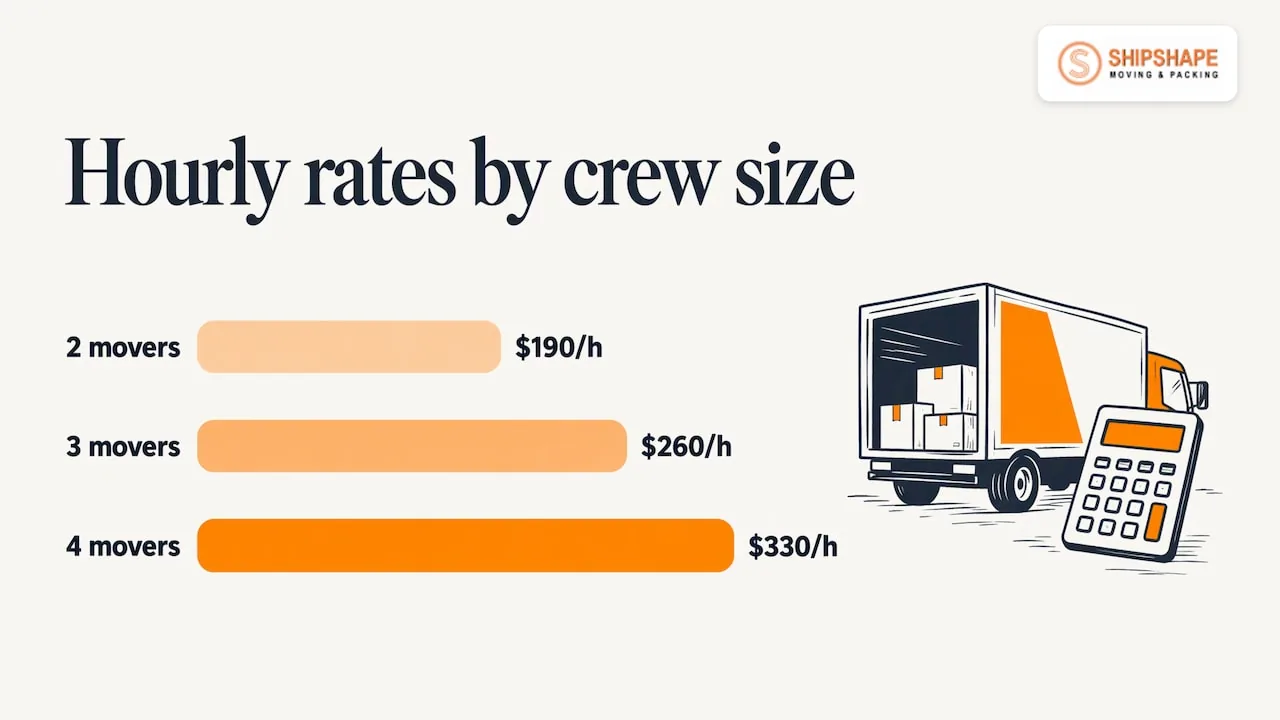
Our local move rates are published, and the three-hour minimum and the $80 one-time truck fee apply to every move. Hourly rates by card are $190 per hour for 2 movers, $260 per hour for 3 movers and $330 per hour for 4 movers. Paying cash is $10 per hour less than the card rate. Your final cost depends on crew size, the complexity of the move and the hours worked, and additional services such as packing are billed on top. We provide written not-to-exceed quotes, and a deposit is occasionally required to secure a date.
Small teams that move a handful of workstations and a network closet can plan crew size around how many floors and how much equipment are involved. Our guide to an office move budget shows what to include.
Get your office technology moved with a crew you can name
If you are moving an office in Oakland, Berkeley, San Francisco or elsewhere in the Bay Area, we can plan the move around your inventory and your building. Our crews are full-time ShipShape employees, never subcontractors, and our five 26-foot box trucks each carry a loading ramp, blankets, stretch wrap, dollies, straps and floor and door-frame protection. We also take apart and reassemble furniture as part of a booked move, which helps with workstations and desks.
Tell us your floors, your loading situation and your inventory, and get a free quote for your office move.

Our perspective
We think of an IT move as two jobs that have to meet in the middle. Your IT lead owns the data, the network and the restart. The moving crew owns everything physical: how a rack is wrapped, how a monitor is carried down a stairwell, and whether the right box lands in the right room.
What we can offer is the second job done carefully. Our crews are full-time ShipShape employees, every mover is background checked before their first job, and our trucks arrive stocked with the blankets, wrap, dollies, straps and floor protection that office buildings call for. We would rather work from your labeled inventory than guess, because a clear label saves everyone time on both ends of the move.
If your move involves several departments, a packed schedule or equipment that needs white glove handling, bring it to us early. Early planning is the single biggest thing we can help you with.
Dennis
FAQ
What should an IT equipment move checklist include?
It should include an inventory with a move, replace, retire or leave behind status for every item, verified backups, configuration exports, photos of the rack, and labels on devices and both ends of each cable. After the move, add a restart order and a test sheet. The sections above give each step in sequence.
Can movers handle server racks and network gear?
IBM’s guidance for its Power Systems equipment says to use professional movers or riggers and to engage qualified experts when special rigging is needed. Our crews handle physical transport for office and commercial moves, while your IT lead handles shutdown, configuration and testing.
How far ahead should I plan an office IT move?
Start while you are still choosing the space, as NetSys advises, because circuits, building access and floor plans all affect the schedule. The recurring pattern is that network circuits and building reservations take the longest to arrange, so settle those before you fix the moving date.
Should staff pack their own computers?
Staff can pack personal items and carry laptops, and a labeled desk plan makes the rest straightforward. For monitors, towers and docks, groups packed with their cables and labeled to a destination desk are easiest to unpack. If you would rather not have your team pack, we offer packing and labeling as part of a move.
Sources
- IT Relocation & Office Moves: How To Move Equipment (TechMate, 2024)
- Office Relocation IT Services & Move Planning (NetSys, 2026)
- Power Systems: Site preparation and physical planning (IBM, 2021, 2023)
- Business technology planning (Ready.gov)
- Contract warehousing and move-in coordination (Envio 3PL)